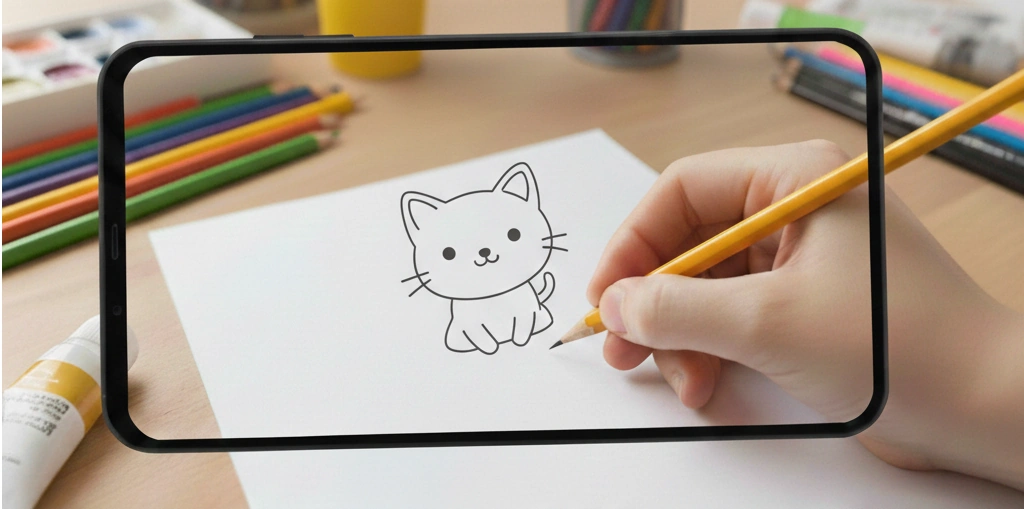
What is AR Tracing in Sketchdoo?

AR Tracing is a feature in Sketchdoo that projects drawing templates onto real paper through your device screen. Unlike regular drawing apps where kids draw on a touchscreen, AR Tracing lets children trace with a real pencil on actual paper while using digital guidance. This makes it the best tracing app for kids who want to practice drawing on paper.

Key facts about Sketchdoo AR Tracing:

  • Works on tablets, phones, and any device with a screen
  • Projects drawings from a gallery of hundreds of templates
  • Allows adjusting size, position, and opacity of the projected image
  • Free to use with no subscription required
  • Available at sketchdoo.com/ar-tracing

How to Use AR Tracing: Step-by-Step Guide

AR Tracing is designed to be simple enough for kids to use independently. Here's how to trace drawings onto paper:

  1. Go to the Gallery: Visit the Sketchdoo Gallery and choose any drawing – animals, characters, shapes, or more.
  2. Select AR Tracing Mode: After selecting a drawing, tap "AR Tracing" from the options.
  3. Prepare Your Paper: Place a blank sheet of paper on a flat, stable surface.
  4. Position Your Device: Hold your tablet or phone above the paper, viewing the paper through the screen.
  5. Adjust the Drawing: Use pinch gestures to resize. Drag to reposition. Use the opacity slider to make the image lighter or darker.
  6. Lock the Image: Tap the lock button to freeze the drawing in place.
  7. Trace with a Pencil: While looking at your screen, use a pencil to trace the visible lines onto your paper.

Why AR Tracing is Better Than Screen Drawing for Kids

While touchscreen drawing has its place, AR Tracing offers unique benefits for children learning to draw:

1. Develops Fine Motor Skills

Holding a pencil and controlling it on paper requires different muscle movements than touching a screen. Tracing on paper helps children develop the fine motor control needed for handwriting and detailed artwork.

2. Creates Physical Artwork

Digital drawings stay on screens. With AR Tracing, kids create real paper artwork they can:

  • Hang on the refrigerator
  • Give as gifts to grandparents
  • Add to an art portfolio
  • Color with crayons, markers, or colored pencils

3. Reduces Screen Time While Learning

AR Tracing uses the screen only as a guide. Children spend most of their time looking at paper and drawing with a pencil, making it a low-screen-time alternative to fully digital drawing apps.

4. Builds Confidence for Freehand Drawing

Tracing teaches proportions and shapes. After tracing several drawings, children often feel confident enough to draw freehand without guides.

AR Tracing vs Light Box Mode: Which Should You Use?

Sketchdoo offers two ways to trace drawings onto paper. Here's when to use each:

FeatureAR TracingLight Box Mode
How it worksHold device above paper, trace what you see through screenPlace paper on screen, trace using screen backlight
Best forTablets and larger screensThin paper and bright screens
Paper placementPaper is separate from devicePaper rests directly on screen
LinkTry AR TracingTry Light Box

Best Practices for AR Tracing Success

Get the best results with these tips:

  • Lighting: Ensure good room lighting so you can see both the screen and paper clearly.
  • Thin paper: Regular printer paper works well. Construction paper may be too thick.
  • Stable surface: Draw on a table, not on a soft surface like a bed or couch.
  • Start simple: Begin with basic shapes before moving to detailed characters.
  • Use the lock feature: Lock the image position once you have it aligned perfectly.
  • Low opacity for guides: Reduce opacity to about 50% so the image guides without overwhelming your pencil lines.

What Drawings Can Kids Trace with AR Tracing?

The Sketchdoo Gallery includes hundreds of drawings organized by category:

  • Animals: Cats, dogs, unicorns, butterflies, fish, and more
  • Characters: Popular cartoon-style characters
  • Shapes: Circles, triangles, stars – perfect for beginners
  • Nature: Flowers, trees, houses, suns
  • Food: Pizza, ice cream, cupcakes

Frequently Asked Questions About AR Tracing

Is AR Tracing free to use?

Yes. Sketchdoo AR Tracing is completely free with no subscription or in-app purchases required.

What devices work with AR Tracing?

AR Tracing works on any device with a screen – iPads, Android tablets, smartphones, and computers. Larger screens like tablets provide the best experience.

What age is AR Tracing suitable for?

AR Tracing is designed for children ages 4 and up, though younger children may need help positioning the device.

Can I use my own photos with AR Tracing?

AR Tracing works with drawings from the Sketchdoo gallery. For tracing your own photos, use the Upload Image feature with on-screen tracing.

Is AR Tracing the same as augmented reality?

AR Tracing is inspired by augmented reality concepts but doesn't use camera-based AR. Instead, it projects images through your screen for you to trace onto paper below.

Start Tracing Today

AR Tracing is the perfect bridge between digital learning and traditional art. Whether your child wants to draw cute animals, practice shapes, or create gifts for family, Sketchdoo's AR Tracing makes it easy and fun.

Ready to try it? Browse the Gallery and pick your first drawing to trace!